1
/
of
8
KINGBOLEN
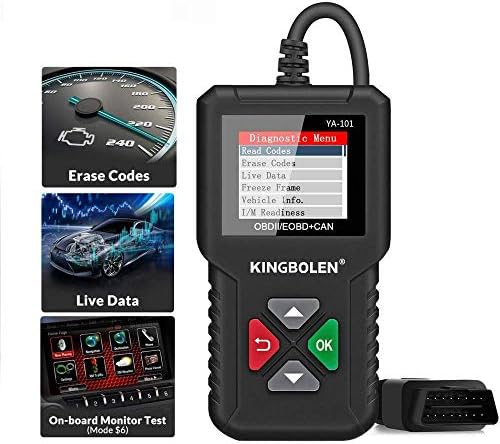
KINGBOLEN Full OBD2 Scanner Code Reader Engine Diagnostic Tool
KINGBOLEN Full OBD2 Scanner Code Reader Engine Diagnostic Tool
Regular price
$31.98 USD
Regular price
Sale price
$31.98 USD
Shipping calculated at checkout.
Quantity
Couldn't load pickup availability
About This
- NO EXTRA BATTERIES OR APPS REQUIRED No need battery nor internet connection, just plug the obd2 scanner for car into obd2 port to reset check engine light. The car diagnostic code reader is suitable for US-based car made after 1996 and EU-based car made after 2000 which equipped with OBD2 (OBDII protocols: KWP2000, ISO9141, J1850 VPW, J1850 PWM and CAN), which is for 12V car and light truck.
- TURNING OFF THE CHECK ENGINE LIGHTWith YA101 model you never have to worry about the illumination of the Check Engine Light as it successfully turns off the said light, clears the relevant code and also reset the display.
- EXTENSIVE TROUBLE CODES CATALOG The device boasts an expansive catalog of trouble codes along with their detailed descriptions to ensure tech peak performance of you're vehicle all the time. YA101 scanner also features the capability to foretell whether your vehicle would pass or not in the O2 sensor test even before you take it to a test center.
- SIMPLICITY OF DESIGN A good scanner must be easy to operate. It features the simplest of design with only a couple of buttons which makes it easier to read and clear the codes in a faster way. The device sports a nice backlist LCD display which is clearly legible at all conditions. The display also offers a convenient multilingual menu at the same time.
- LIFETIME UPDATE AND MULTI-LANGUAGEWe provide 100% Full Refund & Return Guarantee. YA101 allows users change the language, including English, Chinese, France, Deutsch, Italian, Japanese, Espanish, Russian, Portuguese
Overview
- Brand : KINGBOLEN
- Power Source : Battery Powered
- Operating System : Windows 7
- Screen Size : 1.8 inches
- Item Highlight : Automotive Scan Tool Checks O2 Sensor & EVAP Systems, DTC Lookup, All 10 OBD2 Modes, Easy Engine Light Diagnosis See more
- 1.KINGBOLEN is a comprehensive enterprise group, established in 2010, dedicated to automotive and everyday accessories productsproviding OEM/ODM serivices to the customers around the world.
- 2.KINGBOLEN develops various devices to meet the different needs of each car owner, such as OBD2 Scanner, Car Battery Tester, TPMS Tools and many more, to provide you with the most innovative and cost-effective solution in the automotive aftermarket.
- KINGBOLEN Automatic ScanTool SUPPORT 1 -Yr. Warr-anty and 30-Day Unconditional Re-turn ! One-click Lifetime Free Upgrade keep you always enjoy the Newest software and Vehicle Models.
- Diagnostic Tool needs to be connected to WiFi for the First time to install and Auto update NEW CAR Model Data Packets. After the update is complete, offline use is supported.
- Car care and repair can be expensive, especially if you don't know what the issue is. While you can take it to a mechanic to diagnose the problem, having some automotive expertise and a DIY attitude can save you money and time by locating the issue yourself. To do this, you need an on board diagnostic II (OBD-II) scan tool. This automotive tool will communicate with a car's on board computer system to see what issues the sensors and computer detect. To help boost you're automotive detective skills, here’s our OBD-II scanner YOU should check out.
- Locating Data Link Connector
- 1.Choose a location under driver side dash under steering wheel) and use that description in both places.
- 2.If unsure about location of dlc, check vehicle manual or reputable service center about location
- Connect the tool
- 1.If the connector is not there a label should be there indicating the whereabouts of the connector.
- 2.If necessary, remove the cover from the DTC
- 3.Turn the ignition switch to the on position.Do not start the engine
- 4.Plug the OBD connector into the Data Link Connector.
- 5.The tool will attempt to identify the vehicle. If successful, the vehicle identified. if the vehicle cannot be identified, menus will be shown for you to select the vehicle manually.
- I/M Readiness: Displays a snapshot of the state of the vehicle's OBDII Monitors.
- * To review I/M Readiness status,make sure that the ignition key is switched to ON with the engine off.
- * Not all monitors are supported by all vehicles.
Share